Installing the Fig Fanatic App

I love it! Generally I don’t like trying to do online stuff on my phone but the app makes it a lot easier. Plus the logo icon looks super cool on my Home Screen! 😎
I have an android so I don't get a badge/notification alert but it's still makes getting to the site so much easier. No more typing in the whole website name in Google. Woohoo!
 
No nothing more to scroll.. All scrolled out.

First browser i tried was duckduckgo.
The edge.
I have now tried chrome as well.

Screenshot of chrome attached.
 

Attachments

  • Screenshot_20260513_133219_Chrome.jpg
    Screenshot_20260513_133219_Chrome.jpg
    35.8 KB · Views: 3
I'd say check the manifest json. Android is very strict and even a slight typo or missing required field it will say nope and do nothing.
 
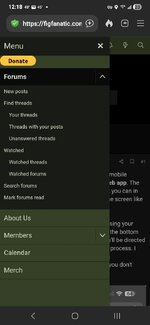
I think I know what’s happening… Because you have installed it before on another device while you were logged in. This is intentional behavior from what I understand. The idea of being that they’re not going to continue advertising the progressive web app to you if you already have it installed… I guess they don’t account for multiple devices. The process should be the same though.

On Chrome.

  • Open Chrome on your Android device and navigate to the figfanatic.com
  • Open the Menu: Tap the three-dot icon in the top right corner.
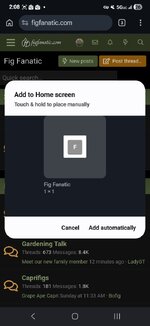
  • Install App: Select Add to Home screen or Install app.
  • Confirm: Tap "Add" or "Install" in the pop-up dialog.
Let me know how that works
 
It just added a shortcut to the home page lol
 

Attachments

  • Screenshot_20260513_140853_Chrome.jpg
    Screenshot_20260513_140853_Chrome.jpg
    52.3 KB · Views: 2
  • Screenshot_20260513_140859_Microsoft Launcher.jpg
    Screenshot_20260513_140859_Microsoft Launcher.jpg
    61.2 KB · Views: 2
@ChicagoFigs I think I fixed it but I don't have an android device at the moment to test it. Could you please log out, clear your cache and try again. It should now be in the fig fanatic menu and also add the correct logo link to your home screen

Let me know how it goes.
 
That's crazy. I just tried again on my sons samsung android on chrome and it worked perfectly. Just out of curiosity, did you try to bypass the menu and just try to add to desktop from chrome? Or another browser?

I need to figure this out.... I can't deal when stuff doesn't work properly
I know that feeling all too well. Gimme a sec I am gonna try something here
 
That's crazy. I just tried again on my sons samsung android on chrome and it worked perfectly. Just out of curiosity, did you try to bypass the menu and just try to add to desktop from chrome? Or another browser?

I need to figure this out.... I can't deal when stuff doesn't work properly
Hmm? maybe it depends on the phone? My wife's phone is an older android. So let me see.
 
Back
Top